Best Mini PCs to Buy in 2026: Top Picks for Every Budget
Explore the best mini PCs to buy in 2026 for work, home, and gaming. Compare features, performance, and practical ways to save on your next purchase.
- Author : Rucha
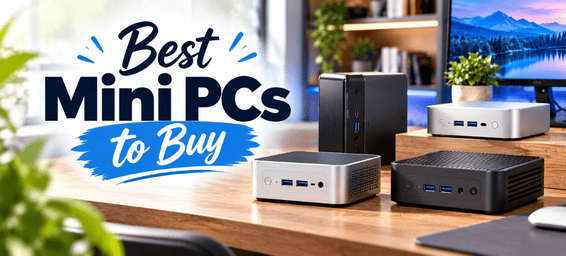
A good desktop computer doesn't have to be a large box sitting under your desk. Mini PCs have made it easier to build a clean, compact workspace without sacrificing the convenience of a dedicated computer. Whether you're working from home, managing everyday tasks, enjoying entertainment or looking for a system capable of handling demanding applications, there's a mini PC to suit a range of needs and budgets.
The trick is knowing which brand and configuration are worth your money. Some mini PCs are designed for browsing, office applications and streaming, while others offer stronger processors, gaming capabilities, expanded connectivity or hardware for AI-related workloads. Spending more doesn't automatically mean getting a better fit, especially if you won't use the extra performance.
What to Check Before Buying a Mini PC
A compact computer can be a great addition to your desk, but a little research beforehand can save you from buying the wrong configuration.
- Processor and Performance - Start by considering the applications you'll use most often. Browsing, document editing and video calls generally don't require the same processing power as video editing, intensive multitasking or demanding games. Choose a processor that suits your workload, with some room for future needs.
- RAM and Storage - Memory affects how comfortably your computer handles multiple applications, while SSD storage determines how much space you have for software, documents, games and media. If you regularly work with large files or keep many applications open, a higher-memory configuration may be worthwhile.
Also check whether the RAM and SSD can be upgraded. Some mini PCs offer more flexibility than others, and upgrade options can matter if you plan to keep the system for several years. - Graphics and Gaming - Don't assume that every mini PC advertised for gaming will run every game smoothly. Integrated graphics can be suitable for lighter gaming and everyday use, but demanding titles may require substantially more graphics power.
Check the actual graphics hardware and look for performance information relevant to the games or applications you use. If gaming is your main reason for buying, also consider cooling and sustained performance rather than focusing on peak specifications alone. - Ports and Connectivity - Think about what you'll connect to the computer. You may need multiple display outputs, USB ports for peripherals, Ethernet for a wired connection or specific ports for external storage and other equipment.
If you plan to run two or three monitors, confirm that the exact model supports your preferred display arrangement and resolutions. Similarly, check any specialised connectivity features before purchasing a system for a workstation or advanced home setup. - Cooling, Noise and Desk Space - Mini PCs save space, but they still need to manage heat. A more powerful processor in a small case may require active cooling, and fan noise can become noticeable under heavy workloads.
If your computer will sit on your desk during meetings or in a quiet room, look for reviews that discuss noise and temperatures during normal use. A compact design is most useful when it fits comfortably into your workspace without becoming a distraction. - Check What's Included - Finally, make sure you know exactly what you're buying. Check whether the price includes RAM, an SSD, an operating system and the power adapter. A barebone configuration may be suitable for someone who enjoys building a system, but a fully configured mini PC can be the simpler choice for everyday users.
If you're shopping for a mini PC, GMKtec and MINISFORUM are two brands worth exploring. Both offer compact systems across different performance levels, but their individual models cater to different types of users. Here's a closer look at what each brand offers, which models deserve your attention and how to find a deal that makes sense for your budget.
1. GMKtec – Best Mini PC Brand for Variety and Value
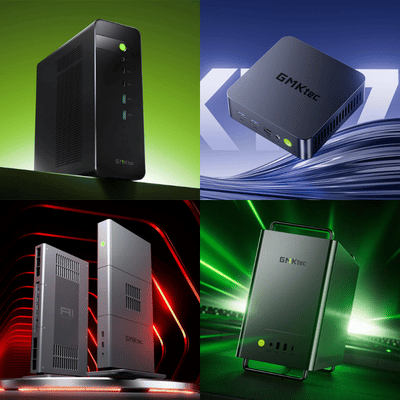
GMKtec is a good starting point if you want plenty of options to compare before making a decision. Its range includes compact computers for everyday use, systems for multitasking, gaming-oriented models and higher-performance machines designed for more demanding computing tasks.
One of the biggest advantages of shopping with GMKtec is that you don't necessarily have to jump into an expensive configuration. You can start with a more affordable system for routine tasks or explore a higher-performance model if your work or hobbies require additional processing power.
Which GMKtec Mini PC Should You Consider?
- For everyday work and study: The GMKtec G10 is worth considering if you need a compact desktop for browsing, office applications, video calls and general home use. It can be a sensible choice for someone who wants a dedicated workspace without spending on gaming-level hardware.
- For multitasking and productivity: Models such as the M6 Ultra and M7 Ultra are worth comparing if you regularly work across multiple applications, manage large spreadsheets or need more processing headroom. Pay attention to the processor, RAM and storage configuration, as these can differ between versions.
- For gaming: If you want to play games on a compact computer, take a look at the K12 and K8 Plus. These models offer more performance-oriented hardware than basic office mini PCs, making them worth exploring for gaming and demanding everyday use. Before buying, check the graphics capabilities and the requirements of the games you play.
- For AI and demanding workloads: GMKtec's EVO series is worth exploring if you're interested in more advanced computing, including local AI applications. These systems can be considerably more expensive than everyday mini PCs, so check the memory capacity, processor capabilities and software requirements before deciding whether you need that level of performance.
What Makes GMKtec Worth Buying?
The main appeal is choice. You can compare different processor families, sizes, performance levels and configurations instead of being limited to a handful of compact desktops. This is particularly useful if you already know your budget but aren't sure how much computing power you actually need.
GMKtec also has models aimed at different setups. Depending on the product, you may find multiple display outputs, fast networking, expandable storage or support for several monitors. These details can make a real difference if you want to connect your mini PC to a home-office setup with external displays, peripherals and additional storage.
Still, don't choose a model based on its processor name alone. A well-equipped mid-range mini PC may be a better fit for everyday work than a more expensive system designed for intensive computing.
How Much Can You Save on a GMKtec Mini PC?
GMKtec's offers can make its range more attractive, particularly if you're comparing several configurations. As a general buying guide, discounts of around 10–30% on selected mini PCs are a reasonable range to look for, while certain promotional or clearance deals may offer reductions of 30–40% or more on specific models.
The savings depend on the system, its configuration and the type of offer available. A newer AI-focused model may have a smaller reduction than an older mini PC that the brand is looking to clear.
Before placing an order, check whether a GMKtec coupon code is available alongside the listed offer. It's also worth comparing the final cost of preconfigured and barebone versions. A barebone mini PC may look cheaper initially, but you'll need to account for any additional memory, storage or operating-system costs.
Best for: Buyers who want a wide choice of mini PCs for home offices, everyday computing, gaming and more demanding applications, with options across different budgets.
2. MINISFORUM – Best for Performance-Focused Compact Computing
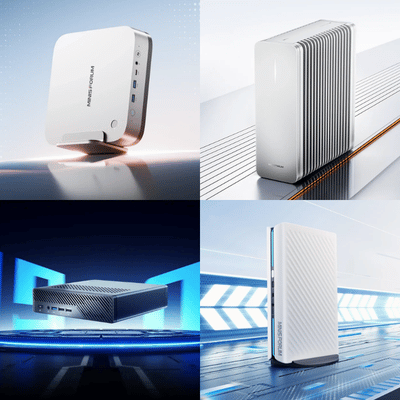
MINISFORUM is another brand worth considering if you want desktop-style performance without committing to a traditional tower PC. Its lineup includes everyday mini PCs, higher-performance systems, gaming models, AI-focused computers and workstation-style machines.
The brand is particularly interesting for buyers who have specific performance requirements. Perhaps you regularly edit large files, run several applications simultaneously, experiment with local AI tools or want a compact system with more extensive connectivity. In those situations, it makes sense to look beyond the smallest or cheapest model and compare the hardware more carefully.
Which MINISFORUM Mini PC Should You Consider?
For everyday computing: Explore the EliteMini range if you need a compact computer for work, study, browsing and entertainment. Look for a configuration that provides enough memory and storage for your daily applications rather than paying for performance you may never use.
- For demanding multitasking: The UM890 Pro is worth exploring if you're interested in a higher-performance AMD Ryzen-based system. It may suit users who want a compact desktop for demanding productivity tasks, provided its specifications match their software and workload requirements.
- For gaming: MINISFORUM's AtomMan family includes gaming-oriented systems that are worth comparing if gaming performance is high on your list. Look at the graphics hardware, cooling, supported resolutions and the games you plan to play before choosing a model.
- For AI and advanced computing: The AI X1 family is worth investigating if you want a compact system for AI-related applications or other demanding workloads. However, AI performance depends on more than the product label. Check the processor, memory, supported software and the specific requirements of the tools you intend to run.
- For workstation-style use: Models such as the MS-01 and other systems in MINISFORUM's workstation range may appeal to users who need more connectivity or a specialised setup. If you plan to connect several displays, external storage or networking equipment, check the available ports and expansion options before purchasing.
What Makes MINISFORUM Worth Buying?
MINISFORUM offers a range of systems that can suit buyers who want more than a basic compact desktop. Depending on the model, you can find powerful processors, generous memory configurations and connectivity features that make it easier to build a more specialised workspace.
That doesn't mean every MINISFORUM mini PC is intended for advanced users. The range includes different performance levels, so it's worth comparing models based on what you actually do rather than assuming the most expensive option is automatically the best.
One detail worth checking is whether the system comes fully configured. Some versions may be sold without RAM, storage or an operating system. These can be appealing if you prefer to customise your own hardware, but a preconfigured system may be more convenient if you want to get started without additional setup.
How Much Can You Save on a MINISFORUM Mini PC?
MINISFORUM's pricing varies considerably across its range, so it helps to compare models with similar specifications. As a general guide, savings of around 15–30% on selected mini PCs are worth looking for, while certain promotional offers or older configurations may be discounted by 20–40% or more.
Higher-performance systems can have a different pricing pattern from mainstream mini PCs. A newly released model may hold its price more firmly, while an older configuration could receive a larger reduction as newer hardware becomes available.
If you're planning to buy, check whether a MINISFORUM discount code is available and review the conditions before using it. Some offers may apply only to selected products, and a coupon may not combine with an existing sale price. Compare the final cost of the exact configuration you want, including any components you may need to purchase separately.
Best for: Buyers looking for compact computers with performance-oriented configurations, gaming options, AI capabilities or workstation-style features.
Check Today's MINISFORUM Deals
When Is the Best Time to Buy a Mini PC?
You don't necessarily have to wait for a major shopping event to find a good mini PC deal. Both brands can offer price reductions on selected systems throughout the year, although the depth of the discount depends on the model and promotion.
For a general idea of what to look for, 10–20% off can be a useful saving on a system that already fits your needs, while a reduction of around 20–30% may make a shortlisted model more appealing. Larger discounts can sometimes appear on older configurations, clearance products or limited-time offers, but it's worth checking the original specifications and included hardware before assuming you've found a bargain.
Major shopping events such as Black Friday and Cyber Monday can be good opportunities to compare prices. However, don't let a countdown timer or a large advertised percentage rush you into a purchase. If you don't need a high-end model, a smaller discount on a suitable mid-range system may be a better decision than spending more on hardware you won't use.
It's also worth checking coupon codes before checkout. A valid code may offer an additional saving on an eligible product, but terms vary. Compare the final price after applying any available offer, and check whether the discount applies to your chosen configuration.
Final Thoughts: Which Mini PC Brand Should You Buy?
The best mini PC depends on how you plan to use it. GMKtec and MINISFORUM are both worth considering if you want a capable computer that doesn't take over your desk. GMKtec stands out as a starting point for shoppers who want to compare a wide variety of compact systems for everyday computing, productivity, gaming and more demanding applications. MINISFORUM is a strong alternative to explore if you're looking for performance-oriented configurations, specialised connectivity or compact systems designed for more advanced workloads.
The right choice depends on what you expect from your computer. If you mainly browse the web, work on documents and stream content, a straightforward mini PC may be more than enough. If you edit media, play demanding games or work with AI applications, it's worth spending more time comparing processor performance, graphics, memory and cooling.
Price should be part of that decision, but it shouldn't be the only factor. A discount of 15% on a system that suits your needs can be more worthwhile than a much larger reduction on a model that falls short of your requirements. Keep an eye out for seasonal promotions, clearance deals and eligible coupon codes, and compare the final price of the configurations on your shortlist.
Ultimately, a good mini PC is one that fits your workspace, handles your everyday tasks comfortably and offers the right balance of performance and cost. Take time to compare GMKtec and MINISFORUM models, check what's included and choose the system that makes sense for how you'll actually use it.